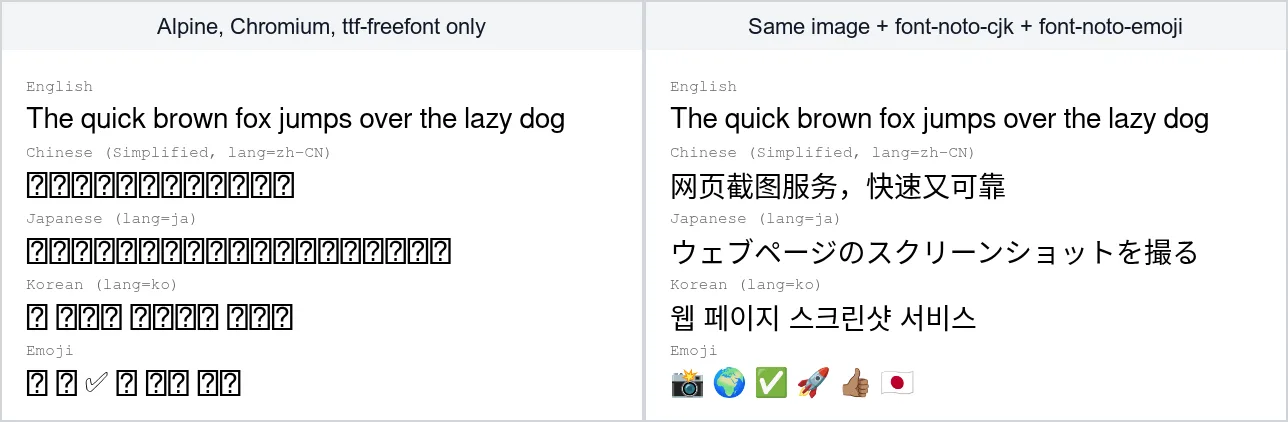
If headless Chrome gives you screenshots where Chinese, Japanese or Korean text and emoji are rows of empty boxes, the container has no font that contains those characters. On Alpine, install font-noto-cjk and font-noto-emoji. On Debian or Ubuntu, install fonts-noto-cjk and fonts-noto-color-emoji. Together they add a little over 100 MB to the image. This article shows what we measured in five container setups on 16 October 2026, why the font list in Puppeteer's own Docker example still leaves emoji broken, and how to make Chrome pick the right Japanese, Chinese or Korean letterforms.
What the boxes are
Every OpenType font has a glyph at position 0 called .notdef. The OpenType specification says it gives the user feedback that a glyph is missing from the font, and recommends drawing it as an empty rectangle, a rectangle with a question mark, or a rectangle with an X. When a page has no web font for a character and no installed font has it either, Chrome draws that rectangle. People call these boxes "tofu". Debian's package description for the Noto fonts notes that the name Noto is short for "No Tofu".
Slim container images ship very few fonts. Our Alpine image, built with the browser and font packages from the Alpine example in Puppeteer's troubleshooting guide, had 32 font files from FreeFont and Open Sans. fc-list :lang=ja, which lists fonts that cover Japanese, found none. A Debian 12 slim image with Chromium installed without recommended packages had six font files, all DejaVu.
What we tested
We built a test page with one line each of English, Simplified Chinese (lang="zh-CN"), Japanese (lang="ja"), Korean (lang="ko") and six emoji, including a skin-tone modifier and a flag. We captured it with puppeteer-core in five images, and listed the fonts Chrome actually used through the DevTools Protocol, with the script shown at the end of this article.
| Setup | Chinese, Japanese, Korean | Emoji | Image growth |
|---|
Alpine 3.23, chromium and ttf-freefont | Boxes | Boxes, except ✅ as a black outline from FreeSerif | None (base) |
Same, plus font-noto-cjk and font-noto-emoji | Noto Sans CJK SC, JP and KR, one per line | Noto Color Emoji | About 104 MB |
Debian 12 slim, chromium only | Boxes | Boxes | None (base) |
| Same, plus the font list from Puppeteer's Docker example | All three in WenQuanYi Zen Hei | Boxes, except ✅ from FreeSerif | About 45 MB |
Same, plus fonts-noto-cjk and fonts-noto-color-emoji | Noto Sans CJK SC, JP and KR, one per line | Noto Color Emoji | About 106 MB |
Image growth is the change in the size reported by docker image inspect. The installed sizes of the packages themselves were 88 MiB for Alpine's font-noto-cjk and 9,956 KiB for font-noto-emoji, and 91,003 KiB and 10,740 KiB for the Debian pair.
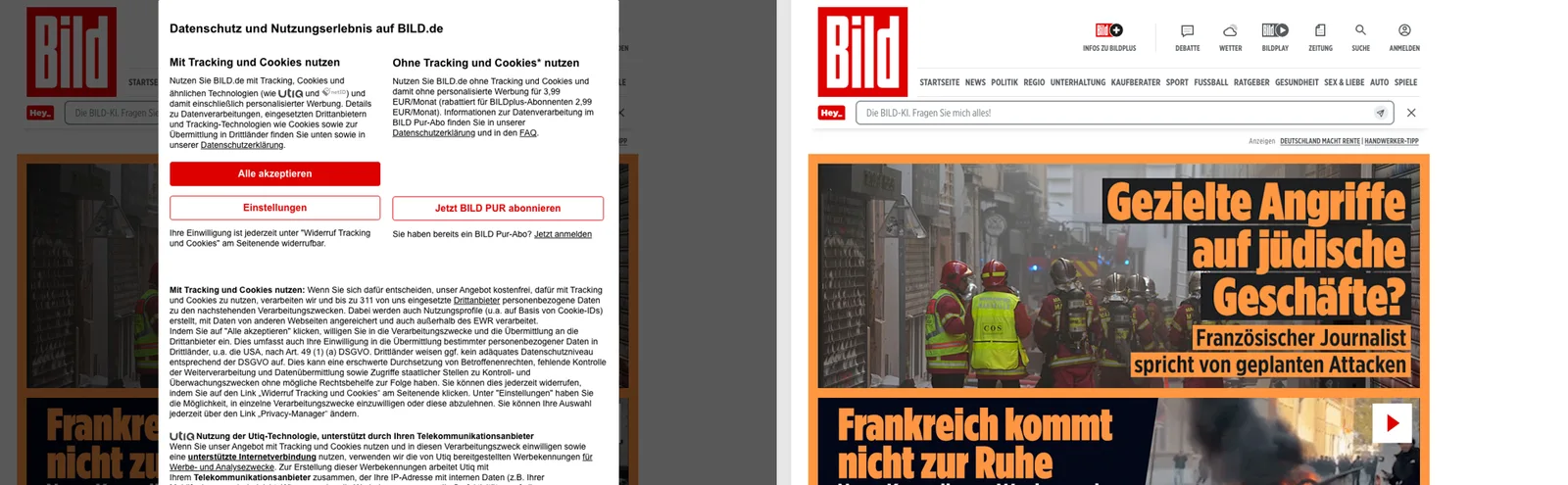
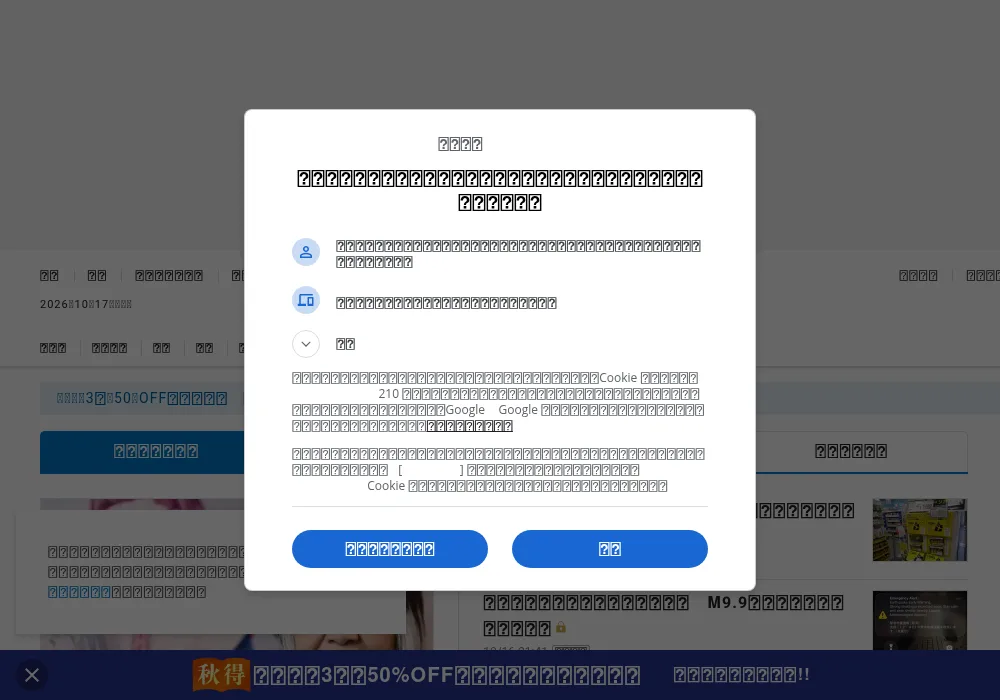
The test page is built to fail, so we also captured a real Japanese page, the home page of the Mainichi Shimbun newspaper, in the Alpine image before and after adding the two packages. Without them, the Japanese text in the consent dialog, the menus and the headlines is all boxes. The only readable Japanese is text drawn into images, such as the 秋得 badge in the bottom banner:
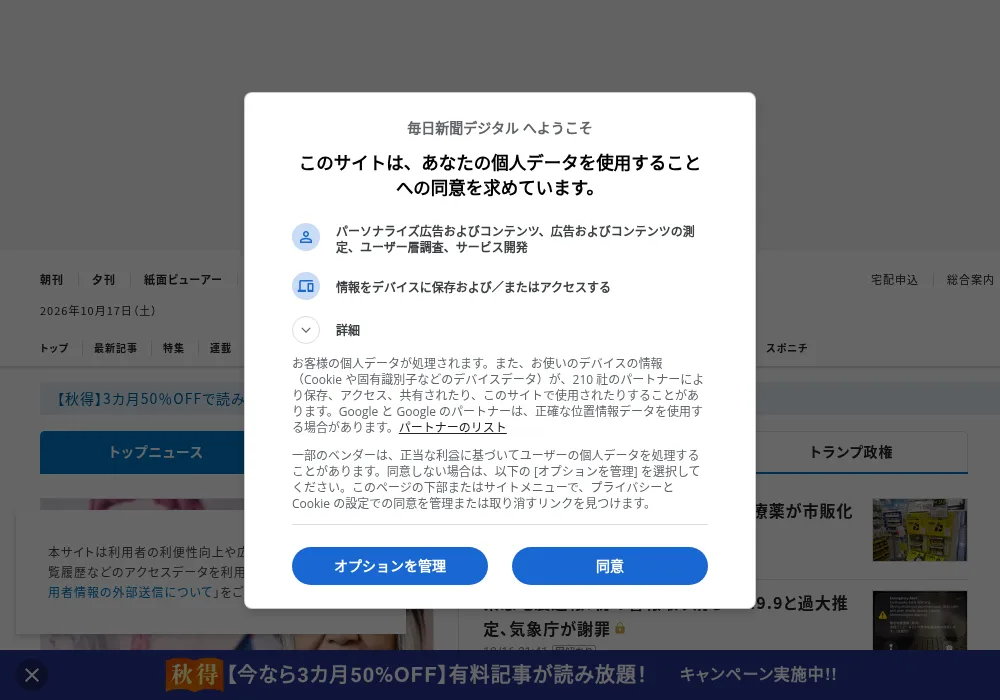
With font-noto-cjk and font-noto-emoji installed, the same capture is readable:
Puppeteer's own font list still leaves emoji as boxes
The Dockerfile in Puppeteer's troubleshooting guide installs fonts-ipafont-gothic fonts-wqy-zenhei fonts-thai-tlwg fonts-kacst fonts-freefont-ttf, with a comment saying the fonts support major charsets such as Chinese, Japanese, Arabic, Hebrew and Thai. In our test, that list did fix Chinese, Japanese and Korean. It did not fix emoji: five of the six were still boxes, and ✅ came out as a thin black outline from FreeSerif rather than a colour emoji.
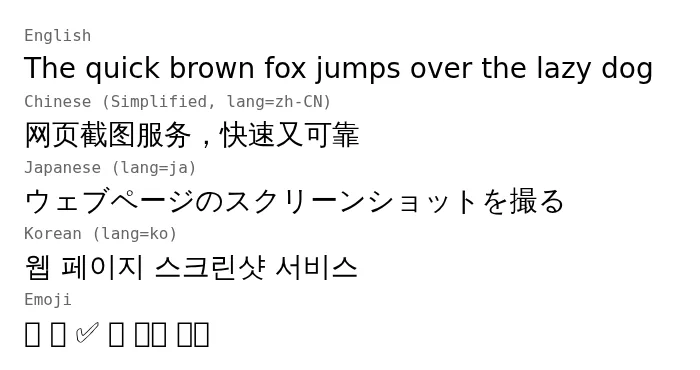
There is a second, quieter problem. Chrome drew all three lines in WenQuanYi Zen Hei, a Chinese font, even though IPAGothic, a Japanese font, was installed. So the Japanese line used Chinese letterforms. The next section explains why that matters.
That list does cover Thai and Arabic, which Noto CJK does not: Debian describes fonts-noto-cjk as Noto families for Traditional Chinese, Simplified Chinese, Japanese and Korean. If you capture Thai or Arabic pages, keep fonts for those scripts as well. We did not test those scripts here.
The fix, as Dockerfiles
On Alpine, this is the Dockerfile we built and tested. The COPY line is optional and is explained in the next section.
FROM node:20-alpine

RUN apk add --no-cache \
    chromium nss freetype harfbuzz ca-certificates ttf-freefont \
    font-noto-cjk font-noto-emoji

# Optional: the Japanese forms for Han text on pages with no lang attribute
COPY local.conf /etc/fonts/local.conf

WORKDIR /app
RUN npm install puppeteer-core@24
On Debian or Ubuntu images:
FROM node:20-bookworm-slim
RUN apt-get update \
&& apt-get install -y --no-install-recommends \
chromium ca-certificates fontconfig \
fonts-noto-cjk fonts-noto-color-emoji \
&& rm -rf /var/lib/apt/lists
Both packages are built from the same January 2022 snapshot of Noto CJK: Alpine's version is 0_git20220127-r1 and Debian's is 1:20220127+repack1-1.
Same character, different shapes: the lang attribute
Chinese, Japanese and Korean share many characters at the same Unicode code point, but, as the W3C puts it, speakers of these languages expect the glyphs to vary, and browsers can use the language of the content to pick an appropriate font. Noto CJK ships separate JP, KR, SC, TC and HK families for this, and its documentation says you switch language by choosing the font or by tagging the text with its language.
We captured seven characters with different lang values in the Alpine image with Noto installed. Chrome picked Noto Sans CJK JP for ja, SC for zh-CN, TC for zh-TW and KR for ko, and the differences are visible in characters such as 直, 骨 and 次:
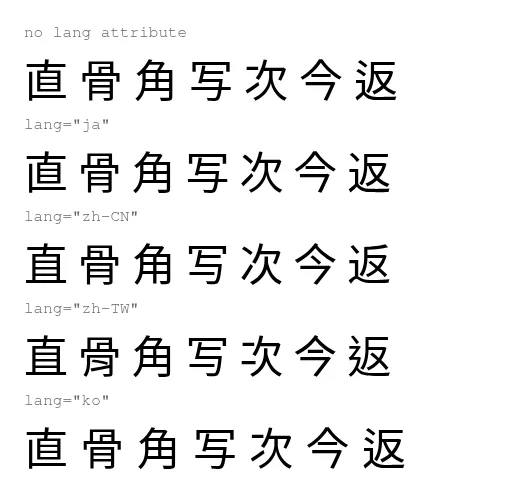
The line with no lang attribute is where the two systems differed. On Alpine, Chrome used the Korean cut, Noto Sans CJK KR. On Debian, it used the Japanese cut. Debian's package also installs a fontconfig rule file, 70-fonts-noto-cjk.conf, while Alpine's installs only the four font files.
If you control the page, set lang on the html element. If you capture other people's pages, you can tell fontconfig, the library Chrome uses to find fonts on Linux, which cut to prefer. Fontconfig's documentation says an alias with a prefer list puts those families in front of the generic family. This local.conf keeps FreeSans for Latin text and puts the Japanese cut first for everything else:
<?xml version="1.0"?>
<!DOCTYPE fontconfig SYSTEM "fonts.dtd">
<fontconfig>
  <!-- Keep FreeSans for Latin, and use the Japanese cut of Noto Sans CJK
       for Han characters on pages that don't say which language they are in. -->
  <alias>
    <family>sans-serif</family>
    <prefer>
      <family>FreeSans</family>
      <family>Noto Sans CJK JP</family>
    </prefer>
  </alias>
</fontconfig>
With it copied to /etc/fonts/local.conf, Chrome drew the unlabelled line with Noto Sans CJK JP, and text tagged zh-CN, zh-TW and ko still got the SC, TC and KR cuts. Choose the cut that matches most of the pages you capture.
Check a capture for missing fonts
Two checks catch the problem before a customer does. The first runs in the image and asks fontconfig whether any font covers Japanese:
docker run --rm my-capture-image fc-list :lang=ja family
In our two base images, Alpine and Debian, it printed nothing. With Noto installed, each listed 15 families.
The second shows which fonts Chrome really used for a given page. It calls CSS.getPlatformFontsForNode, which the DevTools Protocol describes as returning the platform fonts used to render the text in a node. Set CHROME_PATH=/usr/bin/chromium on Debian. We ran it as root in a throwaway container, which is why it passes --no-sandbox.
const puppeteer = require('puppeteer-core');
(async () => {
const browser = await puppeteer.launch({
executablePath: process.env.CHROME_PATH || '/usr/bin/chromium-browser',
args: ['--no-sandbox'],
});
const page = await browser.newPage();
await page.goto(process.argv[2], { waitUntil: 'networkidle2' });
await page.evaluate(() => document.fonts.ready);
const cdp = await page.createCDPSession();
await cdp.send('DOM.enable');
await cdp.send('CSS.enable');
const { root } = await cdp.send('DOM.getDocument', { depth: -1 });
const { nodeIds } = await cdp.send('DOM.querySelectorAll', { nodeId: root.nodeId, selector: 'body *' });
const elements = new Map();
for (const nodeId of nodeIds) {
const { fonts } = await cdp.send('CSS.getPlatformFontsForNode', { nodeId });
for (const { familyName } of fonts) elements.set(familyName, (elements.get(familyName) ?? 0) + 1);
}
for (const [family, count] of [...elements].sort((a, b) => b[1] - a[1])) {
console.log(`${family}: ${count} elements`);
}
await browser.close();
})();
Run against the Japanese Wikipedia article on screenshots in the Alpine image without Noto, it printed:
FreeSans: 850 elements
FreeMono: 45 elements
The same page in the image with Noto installed:
Noto Sans CJK JP: 820 elements
FreeSans: 47 elements
FreeMono: 26 elements
Noto Sans Mono CJK JP: 6 elements
A Japanese page whose list has no CJK family is a page full of boxes: Chrome reports the boxes under the font it was trying to use. An element can contain other elements, so a stretch of text may be counted more than once. Treat the numbers as a rough guide to where each font was used, not as a character count.
What this looked like in our own service
Our API's container image installed only ttf-freefont until 15 October 2026, and Chinese, Japanese and Korean pages came back with boxes. It now installs font-noto-cjk and font-noto-emoji. A capture of the Japanese Wikipedia article above, made with our free website screenshot tool on 16 October 2026, rendered every character. If you run your own capture fleet, the two packages above and one fc-list check in your build are enough to stop this from happening to you.