If a full-page WebP screenshot from Puppeteer or Playwright comes back as an empty file, the page was more than 16,383 device pixels tall (or wide). The WebP encoder inside Chrome refuses anything larger, and Chrome 155 reports the failed encode as a success with no data, so nothing throws. At a device pixel ratio of 3, the scale of phone presets such as Puppeteer's iPhone 14 Pro, that limit is a page just 5,461 CSS pixels tall.
The fix is to check the page size before you capture, then either switch to JPEG or PNG for that page or capture it as several WebP tiles. Below are the tests we ran on 17 October 2026, the Chromium code that explains the empty file, a change arriving in Chrome 157, and a second 16,384-pixel problem we hit only on a machine where Chrome uses the GPU.
The limits we measured
Each format has a largest image Chrome will encode. We found them by capturing blank test pages of exact sizes and, for JPEG, by binary search. The limits were the same on the Mac and in the Debian container.
| Format | Largest side that worked | One pixel more |
|---|
| WebP | 16,383 px | 0 bytes, no error |
| JPEG | 65,500 px | 0 bytes, no error |
| PNG | 65,536 px, the largest we tried | Not reached |
All three numbers are in device pixels: CSS pixels multiplied by the device scale factor. So the tallest page that fits in one WebP depends on the scale you capture at.
| Device scale factor | Tallest page as one WebP | First size that came back empty |
|---|
| 1 | 16,383 CSS px | 16,384 CSS px |
| 2 | 8,191 CSS px (16,382 device px) | 8,192 CSS px |
| 3 | 5,461 CSS px (16,383 device px) | 5,462 CSS px |
This is not new. Chrome 138, the build bundled with Puppeteer 24.11.1, gave the same empty WebP at 16,384 pixels in our first run.
Reproducing it in Puppeteer
This script captures a blank page 16,383 and then 16,384 pixels tall, in WebP and in PNG, and then a viewport 16,384 pixels wide. Set CHROME to the path of your Chrome or Chromium.
const puppeteer = require('puppeteer-core');
(async () => {
const browser = await puppeteer.launch({
executablePath: process.env.CHROME,
args: process.getuid() === 0 ? ['--no-sandbox'] : [],
});
const page = await browser.newPage();
console.log(await browser.version());
await page.setViewport({ width: 400, height: 600 });
for (const height of [16383, 16384]) {
await page.setContent(`<body style="margin:0"><div style="height:${height}px"></div></body>`);
const webp = await page.screenshot({ type: 'webp', fullPage: true });
const png = await page.screenshot({ type: 'png', fullPage: true });
console.log(`${height}px tall: webp ${webp.length} bytes, png ${png.length} bytes`);
}
await page.setViewport({ width: 16384, height: 100 });
const wide = await page.screenshot({ type: 'webp' });
console.log(`16384px wide: webp ${wide.length} bytes`);
await browser.close();
})();
Output on the Mac:
Chrome/155.0.8059.84
16383px tall: webp 12196 bytes, png 51491 bytes
16384px tall: webp 0 bytes, png 51494 bytes
16384px wide: webp 0 bytes
The Debian container printed the same byte counts with Chrome/155.0.8059.79 on the first line. Note what is missing: no exception, no warning, just a buffer of length zero. Code that writes it straight to disk or to a bucket stores an empty .webp file.
Playwright does the same
Playwright accepts webp as a screenshot type since version 1.62. It goes through the same Chrome encoder and gives the same result.
const { chromium } = require('playwright-core');
(async () => {
const browser = await chromium.launch({
executablePath: process.env.CHROME,
args: process.getuid() === 0 ? ['--no-sandbox'] : [],
});
console.log('Playwright', require('playwright-core/package.json').version, '/ Chrome', browser.version());
const page = await browser.newPage({ viewport: { width: 400, height: 600 } });
for (const height of [16383, 16384]) {
await page.setContent(`<body style="margin:0"><div style="height:${height}px"></div></body>`);
try {
const webp = await page.screenshot({ type: 'webp', fullPage: true });
console.log(`${height}px tall: webp ${webp.length} bytes`);
} catch (e) {
console.log(`${height}px tall: webp threw: ${e.message.split('\n')[0]}`);
}
}
await browser.close();
})();
Playwright 1.64.1 / Chrome 155.0.8059.84
16383px tall: webp 520 bytes
16384px tall: webp 0 bytes
The 16,383-pixel file is small because Playwright's default WebP quality of 100 is lossless, and the page is blank. The catch branch never ran.
Why you get an empty file instead of an error
The limit comes from the format. RFC 9649, the WebP specification, stores a lossless image's width and height in 14 bits, which caps it at 16,384 by 16,384 pixels. libwebp, the reference library, defines WEBP_MAX_DIMENSION as 16383 and refuses anything larger. Chrome encodes WebP screenshots with Skia's WebP encoder, which calls libwebp's WebPEncode, so the encode fails one pixel past that constant.
The empty file comes from Chrome. In the Chrome 155 source, the DevTools Protocol handler that answers Page.captureScreenshot checks whether encoding succeeded. When it didn't, it replies with success and an empty payload, under the source comment Page.captureScreenshot call with format: "webp" for a 20,000-pixel page returned a data string of length zero.
JPEG fails the same way at its own limit. 65,500 is the value of JPEG_MAX_DIMENSION in libjpeg-turbo, where a comment explains it sits a little under 64K to avoid overflows. A JPEG of 65,501 pixels came back as 0 bytes. Few pages are that tall, but the failure is just as silent.
Chrome 157 will throw an error instead
Chromium change 8416650, "DevTools: report screenshot encoding failures", landed on 1 October 2026. Its description says encoding failures were returning success with empty data; it makes the handler return a server error, "Unable to encode screenshot", instead, and names the WebP dimension limit as a case it covers. We checked the release branches: the change is in the branch for Chrome 157 and not in the one for Chrome 156. Chromium Dash lists Chrome 156 for stable release on 20 October 2026 and Chrome 157 on 3 November 2026.
We haven't run Chrome 157 ourselves. Going by the source, from 157 on, the same page.screenshot() call will reject with that error instead of resolving to an empty buffer. Code that only checks for zero bytes will meet a rejected promise; code that only catches errors has been storing empty files until now. Handle both.
What it does to a real page
To see the effect on a real page, we captured web.dev's article on browser-level image lazy loading, which is 10,543 CSS pixels tall at a 1,280-pixel-wide viewport. We captured it in the Debian container at each scale and format, with quality 80 for JPEG and WebP.
| Scale | Image size | PNG | JPEG | WebP |
|---|
| 1x | 1,280 × 10,543 | 1.84 MB | 1.30 MB | 0.76 MB |
| 2x | 2,560 × 21,086 | 4.51 MB | 3.34 MB | 0 bytes |
| 3x | 3,840 × 31,629 | 7.52 MB | 5.90 MB | 0 bytes |
At 1x, WebP gives the smallest file of the three. From 2x up, it gives nothing at all, while PNG and JPEG are fine. A pipeline that picked WebP for its file size, and captures retina or phone presets, will lose exactly its tallest pages.
How to avoid it
- Measure the page before you capture:
scrollWidth and scrollHeight of the document, multiplied by the device scale factor.
- If the larger side is over 16,383 device pixels, either capture that page as JPEG (up to 65,500) or PNG, or keep WebP and capture the page in slices of at most 16,383 device pixels each.
- Whatever you choose, treat an empty buffer as a failure, and on Chrome 157 and later, expect an error as well.
A third option is to lower the scale. A page up to 8,191 CSS pixels tall still fits in one WebP at 2x.
This script does steps 1 to 3 both ways, on the same web.dev article at 3x:
const fs = require('node:fs');
const puppeteer = require('puppeteer-core');
const MAX = { webp: 16383, jpeg: 65500 };
async function pageSize(page) {
const { width, height } = await page.evaluate(() => ({
width: document.documentElement.scrollWidth,
height: document.documentElement.scrollHeight,
}));
return { width, height, dpr: page.viewport()?.deviceScaleFactor ?? 1 };
}
async function fullPageShot(page, type) {
const { width, height, dpr } = await pageSize(page);
const side = Math.max(width, height) * dpr;
let chosen = type;
if (MAX[type] && side > MAX[type]) chosen = side > MAX.jpeg ? 'png' : 'jpeg';
const buf = await page.screenshot({ type: chosen, fullPage: true });
if (buf.length === 0) throw new Error(`Chrome returned an empty ${chosen} for ${side} device px`);
return { type: chosen, buf };
}
async function webpTiles(page) {
const { width, height, dpr } = await pageSize(page);
const step = Math.floor(MAX.webp / dpr);
const tiles = [];
for (let y = 0; y < height; y += step) {
const clip = { x: 0, y, width, height: Math.min(step, height - y) };
const buf = await page.screenshot({ type: 'webp', clip, captureBeyondViewport: true });
if (buf.length === 0) throw new Error(`empty tile at y=${y}`);
tiles.push(buf);
}
return tiles;
}
(async () => {
const browser = await puppeteer.launch({
executablePath: process.env.CHROME,
args: ['--disable-gpu', ...(process.getuid() === 0 ? ['--no-sandbox'] : [])],
});
const page = await browser.newPage();
await page.setViewport({ width: 1280, height: 800, deviceScaleFactor: 3 });
await page.goto('https://web.dev/articles/browser-level-image-lazy-loading', { waitUntil: 'networkidle2' });
const { height, dpr } = await pageSize(page);
console.log(`page: ${height} CSS px at ${dpr}x = ${height * dpr} device px`);
const one = await fullPageShot(page, 'webp');
fs.writeFileSync(`out/single.${one.type}`, one.buf);
console.log(`option 1: asked for webp, got ${one.type}, ${(one.buf.length / 1e6).toFixed(2)} MB`);
const tiles = await webpTiles(page);
tiles.forEach((buf, i) => fs.writeFileSync(`out/tile-${i}.webp`, buf));
const total = tiles.reduce((n, b) => n + b.length, 0);
console.log(`option 2: ${tiles.length} webp tiles, ${(total / 1e6).toFixed(2)} MB in all`);
await browser.close();
})();
Output in the Debian container:
page: 10543 CSS px at 3x = 31629 device px
option 1: asked for webp, got jpeg, 5.89 MB
option 2: 2 webp tiles, 2.87 MB in all
A live page isn't identical from one load to the next, so the sizes vary. Across four runs on the Mac and in Linux, the JPEG came to between 3.28 and 5.90 MB and the two tiles to between 2.87 and 2.89 MB.
The tiles came out 3,840 × 16,383 and 3,840 × 15,246 pixels, which add up to the page's 31,629. To check that nothing was lost or doubled at the seam, we compared them, pixel by pixel, with a full PNG of the page from an earlier run. Apart from WebP's lossy compression, the only differences were a demo video on a different frame and the language menu's label, which differed between the two page loads.
Keep in mind that the tiles are separate files. They can't be joined into one WebP, because the joined image would break the same limit. If whoever views the capture needs one file, use option 1.
A second limit on machines with a GPU
While checking our captures, we found a different problem on the Mac. Every PNG and JPEG full-page capture we made there that was taller than 16,384 device pixels had the right dimensions, but everything below row 16,384 was the top of the page again.
To measure it, we built a test page from bands 500 CSS pixels tall, each a different colour, and sampled the middle of every band in the PNG. With the GPU on, the first wrong sample was always the first one taken below device pixel 16,384, and it had the colour of band 0, the top of the page. That held at 1x, 2x and 3x and for pages up to 42,000 device pixels. The same test was correct at every size with --disable-gpu on the same Mac, and in both Linux containers, where Chromium renders in software (SwiftShader).
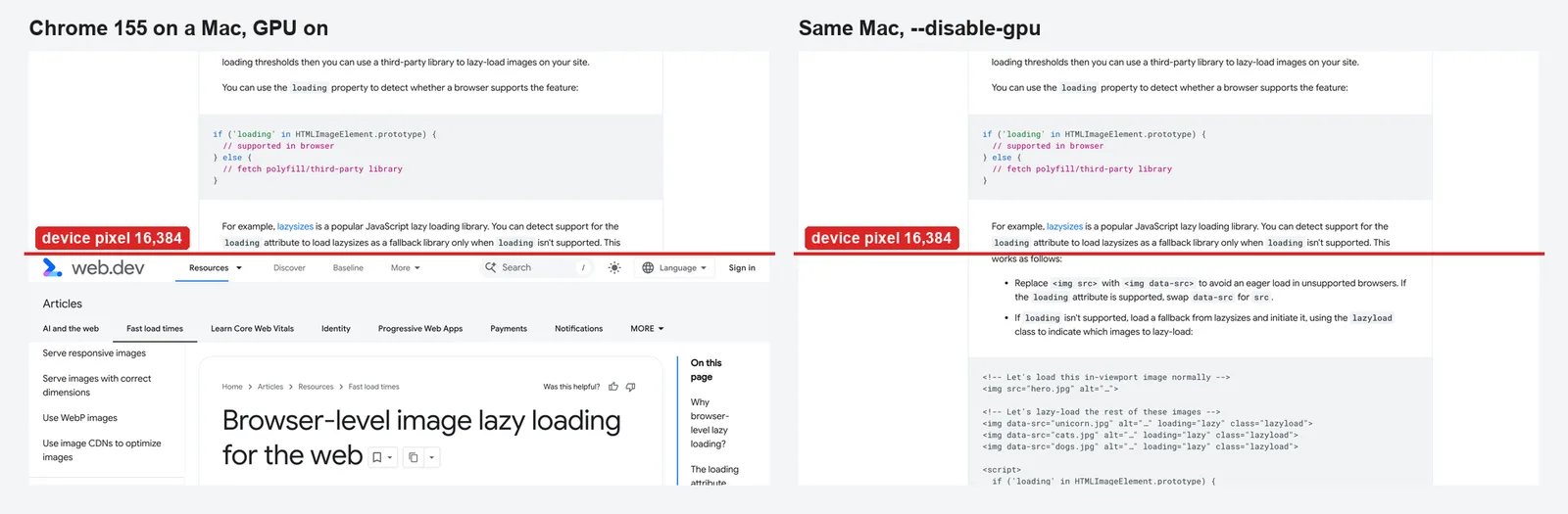
The Chromium source accounts for the repeat. When the captured image is smaller than the size that was asked for, the screenshot handler fills that size with CreateTiledBitmap, which wraps rows around with a modulo. So any rows the capture didn't return are filled from the top. Why the GPU capture stops at 16,384 rows, we can't say for certain. Chrome on this Mac reports 16,384 as the largest WebGL texture (MAX_TEXTURE_SIZE), the same number, but that is a match, not proof.
Two more things we saw with the GPU on. At 3x, the first of our WebP tiles came back with most of the article text missing, though it was under the WebP limit. And with --disable-gpu, pages get no WebGL at all: our check couldn't create a WebGL context, so anything drawn with WebGL, such as some maps and 3D viewers, won't render in those captures.
So if you capture tall pages on a laptop or desktop, launch Chrome with --disable-gpu, or capture on a Linux server. We only tested an Apple M5 Mac; we didn't test Windows or Linux machines with a GPU.
What our screenshot tool does
We first ran into the WebP limit while testing our own free tool: a full-page WebP taller than 16,383 pixels came back as an empty file with a 200 status. Our API now answers that such a page is too tall for WebP, and the free tool keeps WebP captures within the format's limit and says so in its response headers.
On 17 October 2026 we captured the same web.dev article with the free full-page screenshot tool, on its mobile preset, which renders at 3x, in both formats:
| Format | Image size | Height limit header | Cut-off header |
|---|
| WebP | 1,179 × 16,383 | 5,461 CSS px | 1 |
| PNG | 1,179 × 24,000 | 8,000 CSS px | 1 |
The WebP stops at the format's limit, and the PNG at the mobile preset's own cap of 8,000 CSS pixels. Our servers run Chromium on Linux, and the PNG's rows below 16,384 continue the article rather than repeat its top. On a phone preset, PNG and JPEG captures reach further down a long page than WebP: 8,000 CSS pixels instead of 5,461.
How we tested
- Blank pages of exact sizes, captured with
page.screenshot() in Puppeteer and Playwright, and once with a raw Page.captureScreenshot call. The JPEG limit was found by binary search between 16,383 and 65,535 pixels.
- The repeat test used a page of coloured bands 500 CSS pixels tall at 1x, 2x and 3x, from 15,000 to 42,000 device pixels, sampling each band's centre in the PNG.
- The real page was captured at a 1,280 by 800 viewport after
networkidle2. Image sizes were read from the files, and pixel comparisons were made with Pillow.
- Machines: an Apple M5 Mac with macOS 26.6 and Google Chrome 155.0.8059.84; Docker containers with Debian 12 and Chromium 155.0.8059.79, and Alpine 3.23 and Chromium 149.0.7827.53. Libraries: puppeteer-core 25.14.0 and playwright-core 1.64.1.